
If you keep re-explaining your business to Claude every time you open a new chat, Projects fix that. Here is what they are, in plain English, and when you actually need one.
What are Claude Projects?
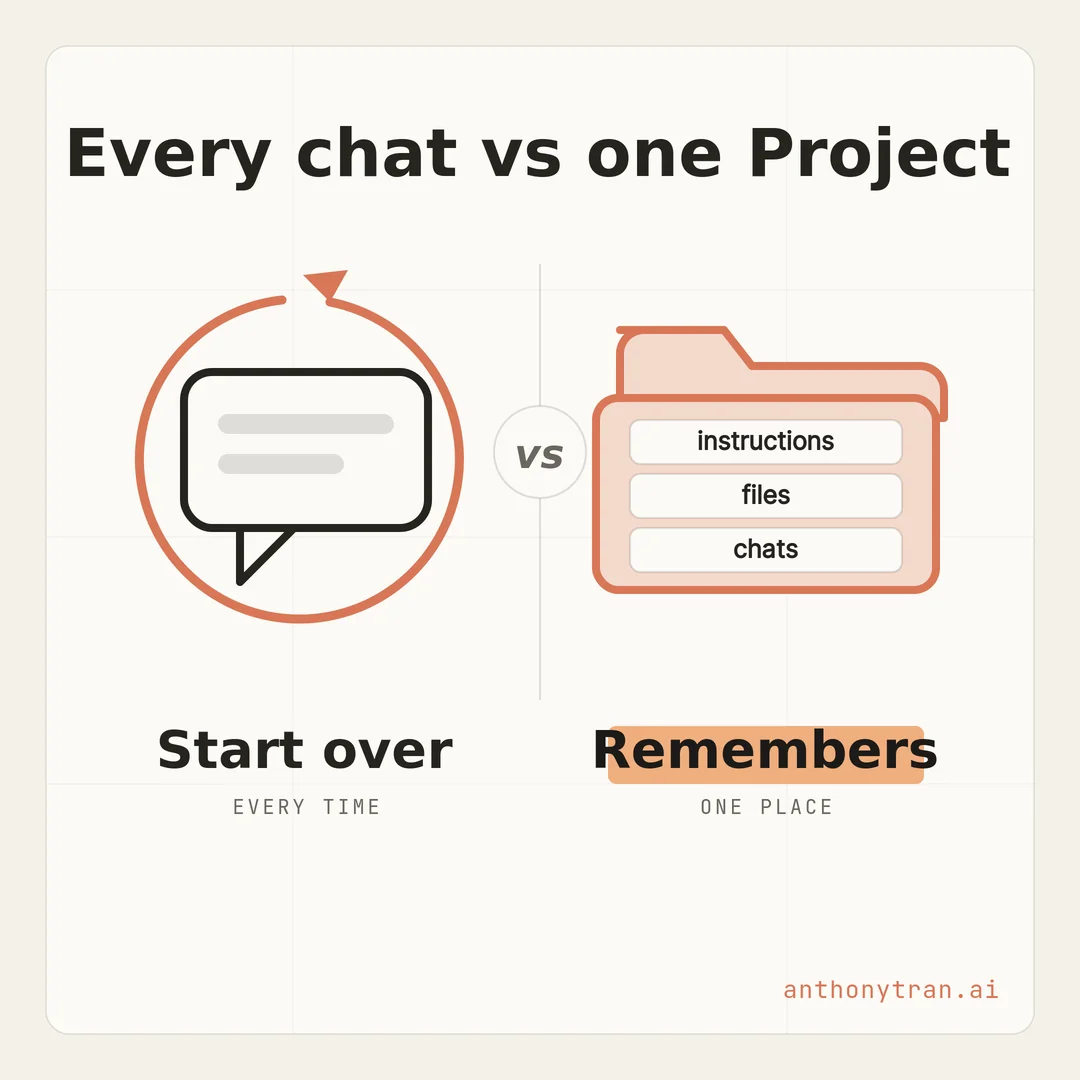
A Project is a workspace inside Claude that keeps your context in one place. It has its own instructions, its own knowledge base of files, and its own chat history.
Every chat you start inside that Project can use the instructions and files you set up once. So you stop re-explaining who you are and re-uploading the same files every single time.
Here is the problem it solves. You have a good chat with Claude, you give it all your context, and you get a great result.
The next day you open a new chat and it knows none of it. You are back to square one, pasting the same background in again.
If that feels familiar, you are the person Projects were built for. A Project is where that stops.
Most of this comes straight from Anthropic’s free Claude 101 course. I took it and put the useful parts in plain English, so you do not have to dig through all of it.
Think of it like a desk for one kind of work
Picture a regular chat as a clean desk. Every time you sit down, the desk is empty.
You pull out your files, explain what you are working on, and then get started. Great for a quick task. A pain when it is work you do all the time.
A Project is a desk that stays set up. Your reference files are already on it.
The sticky note with your instructions is already there. You sit down and get straight to work, because the desk is already set the way you left it.
That is the whole idea. Giving Claude your context is the single biggest thing that improves its answers, and a Project saves you from doing it over and over.
The three parts of a Project
A Project is really just three things working together.
- Instructions. This is where you tell Claude how to behave for everything in this Project. Your tone, your audience, the rules it should follow every time. Think of it as onboarding a new hire once, instead of re-training them every morning.
- A knowledge base. These are the files you upload for Claude to reference. Brand guidelines, past work, a customer list, meeting notes, whatever it should know. You can add PDFs, Word docs, spreadsheets, and text files, or connect Google Drive on a private Project. Claude looks at these across every chat in the Project.
- Its own chats. Every conversation you start inside the Project stays organized there, and each one uses the same instructions and files. Your marketing work does not get tangled up with everything else.
And one nice touch, you are not pasting the same documents into every chat. When your knowledge base gets big, Claude can search it for the most relevant parts instead of trying to hold all of it at once. You still keep your files tidy, but Claude does more of the fetching for you.
When you actually need one
Not every job needs a Project. If it is a one-off question or a quick draft, just use a regular chat. Do not overthink it.
Reach for a Project when the work is ongoing and repeats. A few signs it is time:
- You keep re-uploading or re-explaining the same background.
- You have reference material you use again and again, like brand guidelines, a style guide, or past reports.
- You want Claude to answer a consistent way every time, like always in your voice or always following your template.
If two or three of those are true, that is your Project.
How I use Projects in my business
Let me show you a real one. I keep a Project for my content.
The instructions tell Claude who I am, a marketer writing for other busy business owners, and how I like things to sound, calm and plain with no hype. The knowledge base has my background, my past posts, and notes on my audience.
So when I sit down to write, I do not start cold. I open the Project and say “draft a short post about this,” and what comes back already sounds like me and already talks to my people.
I am not pasting my whole story into a blank chat first. The context lives in the Project, so I just do the work.
That is the difference between starting cold and starting with your business context already in place.
How to set one up
It takes just a few minutes, and you do not need to be technical to do it. I am not a coder, and I set these up all the time.
- Go to claude.ai/projects, or click Projects in the sidebar, then click New Project.
- Give it a clear name, like “Marketing” or “Client Work.”
- Open the instructions and tell Claude how to behave for this Project. Who you are, who you are writing for, the tone, any rules.
- Add your files to the knowledge base. Start with the two or three documents you find yourself explaining or uploading the most.
That is it. Start small and add more as you go.
Depending on your Claude plan, you may also get larger project knowledge, connectors, or sharing. If you are on a Team or Enterprise plan, you can share a Project with coworkers so everyone works from the same context, but you do not need that to get real value out of it on your own.
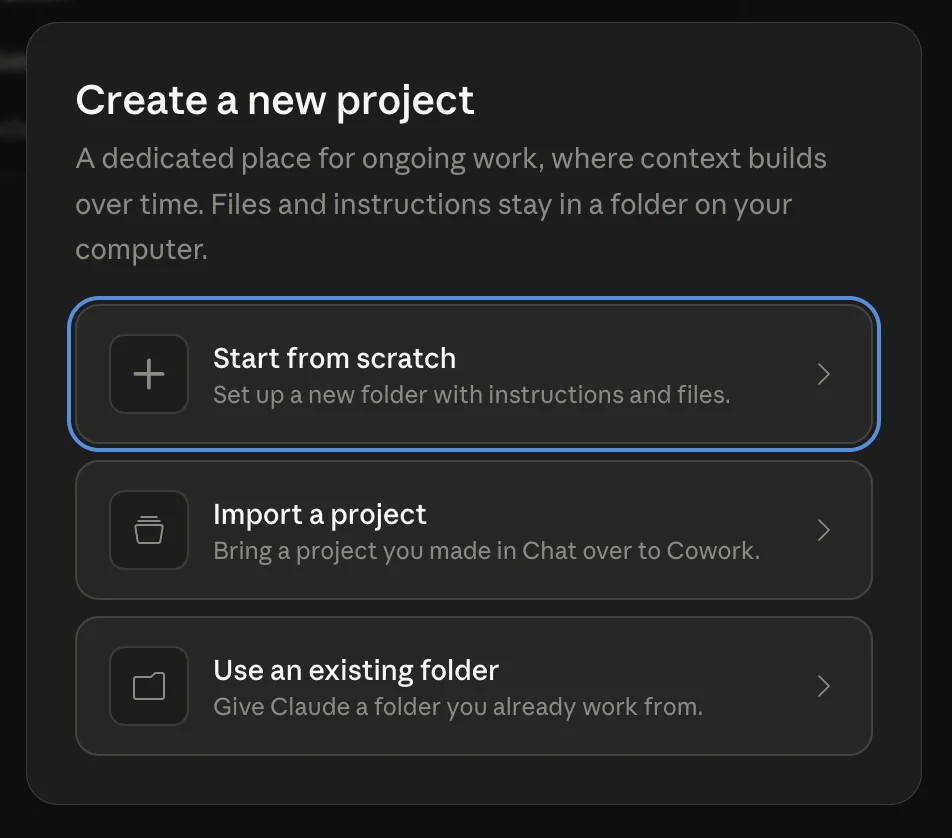
One more thing worth knowing if you use the Claude desktop app. Cowork, the mode for bigger hands-on jobs, has Projects too.
Same idea, one home for ongoing work, with one difference: the files and instructions live in a real folder on your computer. When you create one, it even offers to bring over a Project you made in Chat.
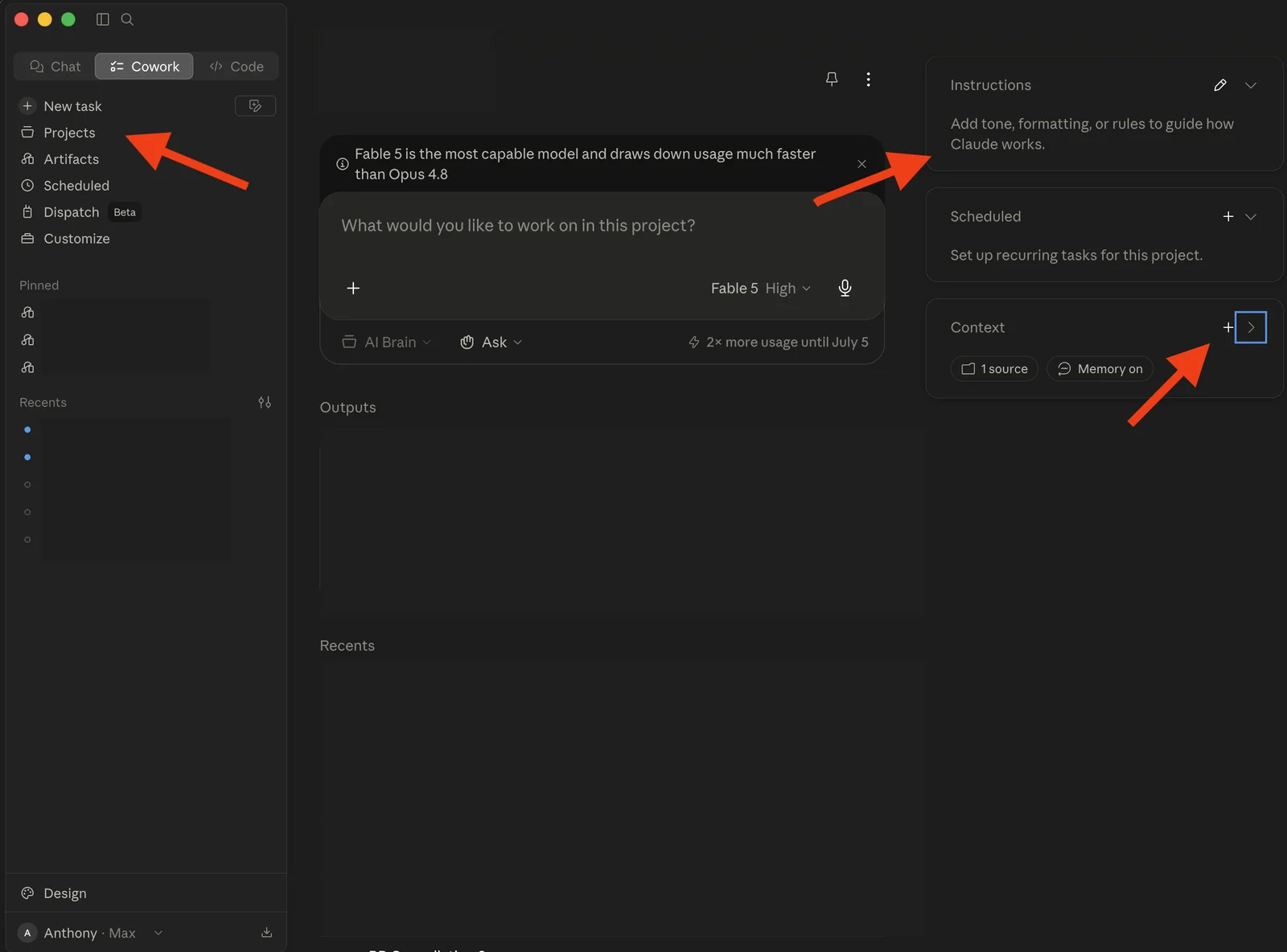
Inside a Cowork project you get the same building blocks this lesson covered, instructions that guide how Claude works and a context panel for the files it should know, plus scheduled tasks that run on their own.
One quick word of caution
A Project is only as good as what you put in it. Two things to keep in mind.
Be careful what you upload, especially client or customer information, and check your plan’s privacy settings before you add anything sensitive. And keep the files current.
Old documents lead to old answers, so clear out anything out of date. Treat the knowledge base like a shelf you tidy now and then, not a junk drawer.
Put This Into Practice
The hardest part for most people is writing the instructions. So let Claude help. Open a normal chat, paste this in, and use the answer as your Project instructions.
I want to set up a Claude Project for [what it is for, like writing content for my business]. Ask me up to 4 questions to understand my business, who I am writing for, and how I want things to sound. Then write clear Project instructions I can paste in, covering who I am, my audience, my tone, and any rules you should follow every time. Keep it plain and specific. No jargon.
Answer its questions, drop the result into your Project’s instructions, and you are set up.
The whole thing in one line
A new chat starts fresh every time. A Project starts with your instructions and files already in place.
If there is one kind of work you keep coming back to with Claude, set up a Project for it this week. The next time you sit down, you will spend less time explaining and more time doing.
~ Anthony
Frequently asked.
What are Claude Projects?
A Claude Project is a self-contained workspace with its own instructions, uploaded files, and chat history. Every chat inside it can use those instructions and files, so you are not re-explaining your background each time.
When should you use a Claude Project?
Use a Project for ongoing work where you reuse the same context, like your content, a client, or a research topic. For a one-off question or a quick draft, a regular chat is fine. If you keep re-uploading the same files or want consistent output, make a Project.
How do you create a Claude Project?
Go to claude.ai/projects and click New Project. Give it a name, add instructions telling Claude how to behave, and upload the files it should reference. Every chat you start inside the Project then uses that context automatically.
Stop re-explaining yourself to Claude.
Grab the free AI Starter Kit: my exact Claude setup, so it knows your business. Plus the lessons as they land.
Anthony Tran
13 years in marketing and an Air Force veteran. I use Claude every day to market and grow my own business, and I break down what works in plain English. Writing and recording from Arizona.